
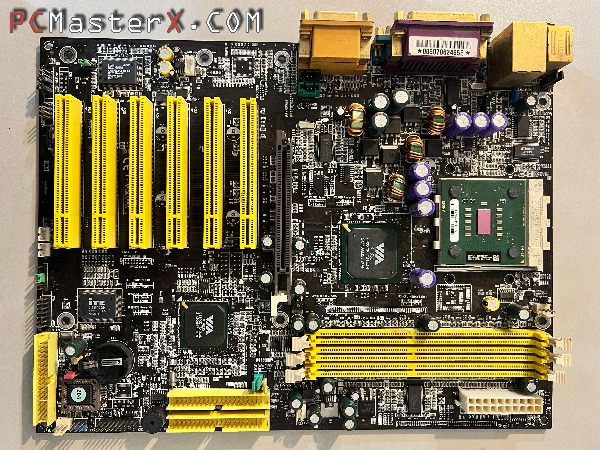
Updating the BIOS "flashing" on an old motherboard from the early 2000s using DOS from a floppy disk and the awdflash utility.
You can follow more detailed instructions on the procedure in this video:
Flashing a BIOS via floppy disk is a classic method. Here is a more detailed, step-by-step guide to ensure the process goes smoothly.
1. Prepare the Bootable Floppy
Format the Disk: Insert your 3.5-inch floppy disk into the drive. In Windows, right-click the A: drive, select Format, and check the box that says "Create an MS-DOS startup disk." This makes the disk bootable.
Add the Tools: Copy the BIOS flashing utility (e.g., awd899.exe) and the specific BIOS binary file (e.g., biosfile.bin) onto the disk.
2. Verify File Integrity
The "Round-Trip" Test: To ensure the floppy doesn't have bad sectors, copy the BIOS file from the floppy back onto your desktop (name it something like test.bin).
Check: If the file copies back without an error, the data on the floppy is likely intact.
3. Configure Boot Priority
Enter Setup: Restart your computer and tap the Del or F2 key to enter the existing BIOS menu.
Set Boot Order: Navigate to the "Boot" or "Advanced BIOS Features" tab. Set the First Boot Device to Floppy or Legacy Floppy.
Save and Exit: Press F10 to save changes and restart with the disk still inserted.
4. Execute the Flash
The DOS Prompt: The computer will boot into a black screen with an A:\> prompt.
List Files: Type dir and press Enter to list the files and confirm the flasher and BIOS file are visible.
Run the Utility: Type awd899 and hit Enter to launch the flashing program.
Input BIOS Name: When prompted by the program, type the exact filename of the new BIOS (including the extension, like .bin or .rom) and follow the on-screen prompts to begin the update.
Crucial Note: Do not turn off the power or reset the computer while the progress bar i s moving, as this can permanently "brick" your motherboard.
---
This was tested on a Chaintech CT-7VJL motherboard. AMD K7 Socket A (PGA462) VIA KT333
With AWDFLASH (Award BIOS flash utility) Version 8.99
---